
Histórico de chat e registros pessoais
Capture conversas longas com rapidez para registros pessoais.
Para pessoas que precisam capturar conteúdo longo sem montagem manual.
Não é só mais um app de screenshot: foi otimizado para conteúdo com rolagem.
Histórico de chat e registros pessoais
Capture conversas longas com rapidez para registros pessoais.
Arquivo de artigos e feeds
Salve conteúdo longo em uma única imagem limpa.
Fluxo para criadores
Gere capturas longas prontas para publicar.
Fluxo mobile, sem precisar de desktop.
Ative o Screen Recording uma vez
Siga o caminho curto para sua versão do iOS.
Inicie o Broadcast com Scrollie
Role o conteúdo naturalmente durante a gravação.
Abra o Scrollie e exporte
Detecte, una e compartilhe em minutos.
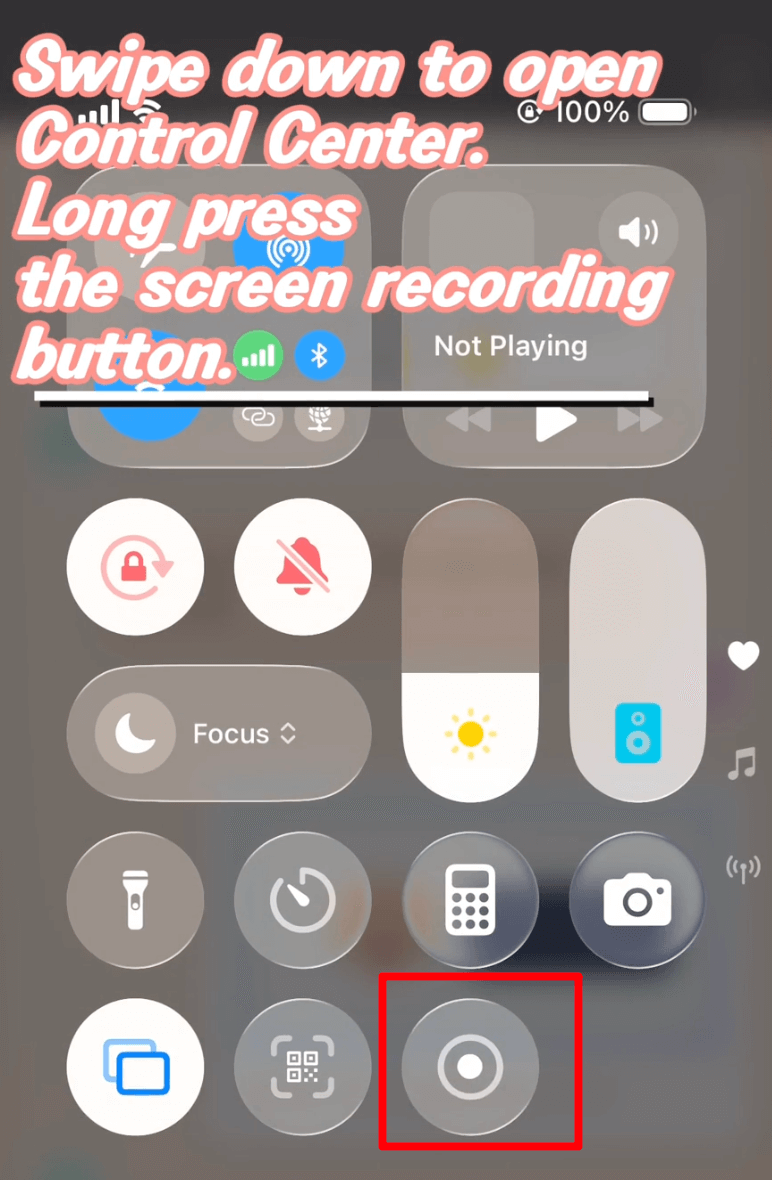
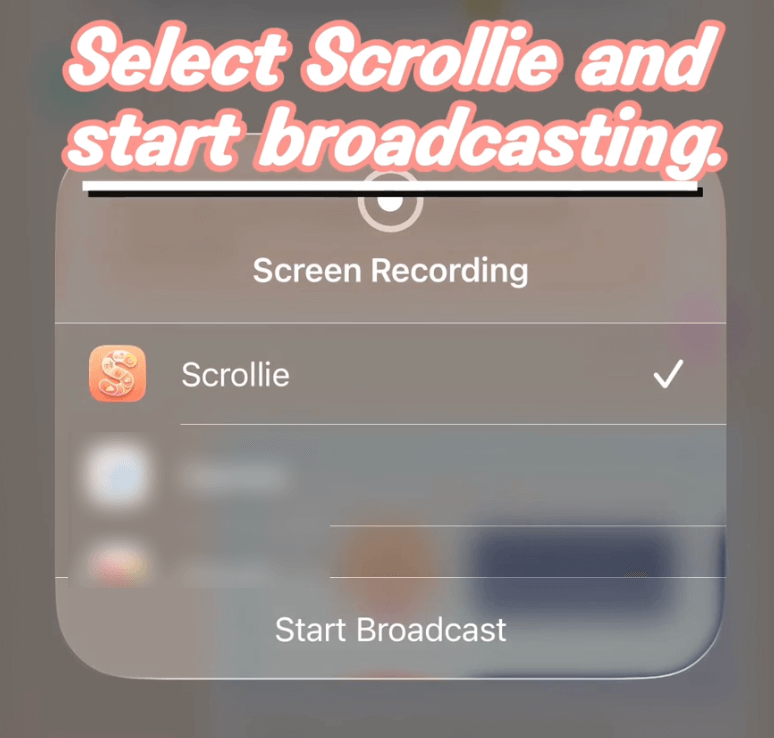
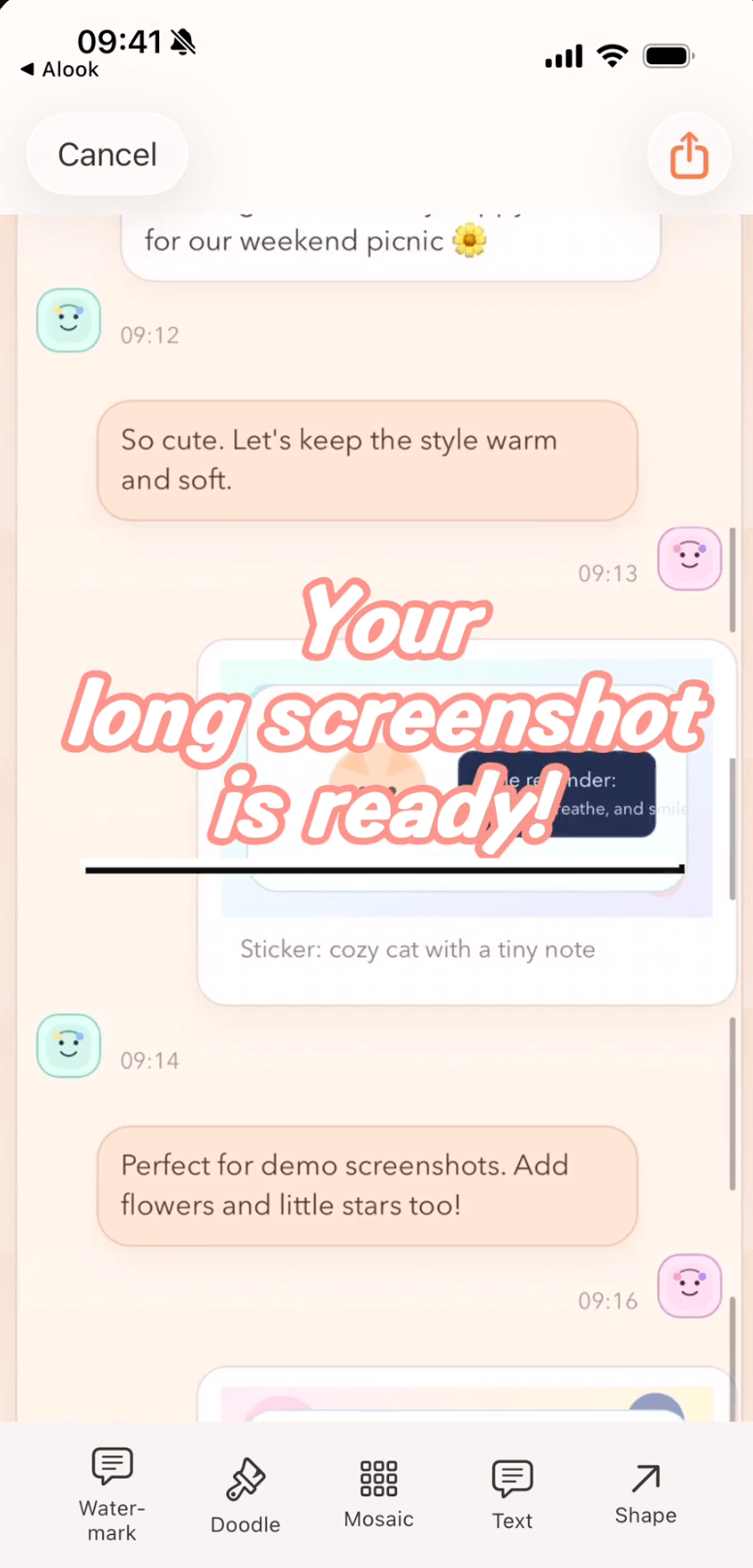
Menos edição manual, menos tempo e capturas mais limpas.
Antes do Scrollie
Com Scrollie
Não. O fluxo principal de união é totalmente processado no dispositivo, sem interação com a nuvem.
Scrollie suporta iOS 16+. O guia separa iOS 18+ e iOS 16-17.
Abra a Ajuda e escolha "De gravação para captura longa".
Comece pelo guia de 30 segundos e conclua sua primeira captura longa hoje.
Sem cadastro nem marca d'água, e suas imagens nunca saem do dispositivo: tudo roda no navegador.
Tutoriais detalhados por tarefa e comparações honestas com outros apps.
Add a Custom Watermark to Photos on iPhone
Pick a built-in logo or upload your own with automatic background removal. Choose Tiled or Corner Badge, then tune position, size and opacity.
Add a Device Frame to a Screenshot on iPhone
Three paths — Apple Design Resources, web mockup generators, and an on-device app — with honest limits for each.
Auto-Group Photos into Collages by Trip
Auto-group a big batch of trip photos into ready-made collages by capture time, place and content, then save the set to an album in one tap.
Combine Multiple Screenshots on iPhone
iOS has no built-in stitcher. Compare Markup, the community Shortcut, and Scrollie — with Smart Cleanup, Fine-tune seams and drafts.
Drafts Inbox & Auto-Save on iPhone Long Screenshots
Every edit is auto-saved as a draft; portrait and landscape drafts are stored separately so rotating the phone never overwrites your work.
Erase Something from a Photo on iPhone
iOS 18 Clean Up requires Apple Intelligence. Scrollie's cleanup brush works on iOS 16+ any device — honest comparison and steps.
How to Make a Photo Collage on iPhone
iOS Photos has no built-in collage. Three real paths — Freeform, Instagram Layout, and a dedicated app — with honest limits for each.
How to Screenshot a Whole Webpage on iPhone
Safari Full Page for the free PDF path; Screen Recording plus Scrollie for anything not in Safari or when you need a real image.
How to Take a Long Screenshot on iPhone
Three legitimate methods — Safari Full Page, Markup, and a dedicated app — with honest limits for each.
iPhone Mockup Generator for Screenshots
Wrap a screenshot in a real iPhone frame — iPhone 17 series with official colors, per-slice mockup, and collage integration.
Layout from Instagram Alternative for iPhone
A Layout from Instagram alternative that adds templates, per-cell edits, Cleanup brush, auto-group by trip and a long-screenshot workflow.
Long Screenshot App for iPhone — The Full Picture
Stitch screenshots, turn a screen recording into one long image, edit with a magnifier, and never lose an edit thanks to auto-saved drafts.
Long Screenshot Shortcut vs Dedicated App on iPhone
Shortcuts stitchers are free and native, but one-shot. A dedicated app keeps the result editable: Fine-tune, Cleanup brush, drafts, collage.
Photo Collage App for iPhone (2–12 Photos)
2–12 photo templates, per-cell editing with doodle, mosaic and Cleanup brush, drag-to-swap cells, and auto-saved drafts on iPhone.
Photo Grid Alternative for iPhone
A Photo Grid alternative that pairs template collages with a long-screenshot workflow, Drafts and a Cleanup brush.
PicCollage Alternative with Long Screenshots
A PicCollage alternative that brings long-screenshot workflows into a collage app: Drafts, auto-group by trip, Cleanup brush.
Picsew Alternative: Drafts, Collage & Cleanup
Same long-screenshot core, plus Drafts, template collages, Cleanup brush, and auto watermark removal — things Picsew doesn't list.
Remove Watermarks from Photos on iPhone
Cleanup brush and one-tap auto watermark removal — two tools for two scenarios, both running on-device.
Save a Chat Conversation as One Long Image on iPhone
Two paths — manual stitching or screen recording — plus how to hide the messages you don't want to share.
Screen Recording to Long Screenshot on iPhone
iOS records the scroll, Scrollie turns it into one long screenshot — auto-stop after the scroll ends, overscroll-back handled, Fine-tune magnifier for seams.
Stitch Multiple Screenshots on iPhone
Auto overlap + Smart Cleanup + Fine-tune magnifier + drafts. Vertical or horizontal, exported as JPEG/PNG/HEIC/PDF/slices.
StitchPics / 长图拼接 Alternative for iPhone
Keep the stitch and template collage you know from StitchPics. Add Drafts, auto-group photos, Cleanup brush, auto watermark removal and PDF export.
Tailor Alternative for iPhone (Actively Maintained)
Keep the classic stitch flow. Add drafts, PDF, template collages, device mockups and a Cleanup brush — the layer Tailor never added.