
채팅 기록과 개인 보관
긴 대화를 빠르게 저장해 개인 기록에 활용하세요.
개인 사용자가 수작업 합치기를 줄일 수 있도록 설계했습니다.
단순 캡처 앱이 아니라 스크롤 콘텐츠 작업에 특화된 도구입니다.
채팅 기록과 개인 보관
긴 대화를 빠르게 저장해 개인 기록에 활용하세요.
기사/피드 아카이브
긴 콘텐츠를 하나의 깔끔한 이미지로 저장합니다.
크리에이터 결과물 제작
게시용 긴 스크린샷을 빠르게 완성합니다.
모바일 중심 플로우로 PC가 필요 없습니다.
한 번만 화면 녹화 설정
iOS 버전에 맞는 짧은 설정 경로를 따르세요.
Scrollie 방송 시작
대상 화면을 자연스럽게 스크롤하며 녹화하세요.
Scrollie에서 내보내기
감지, 합치기, 공유까지 빠르게 완료됩니다.
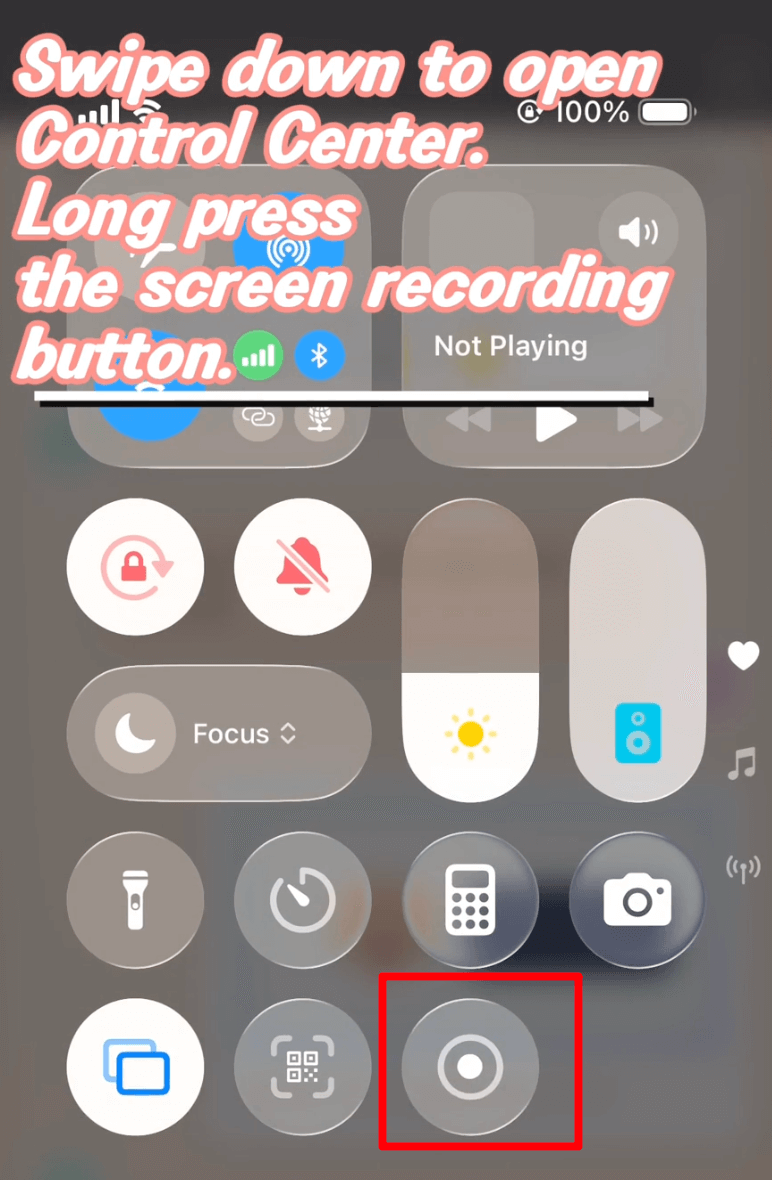
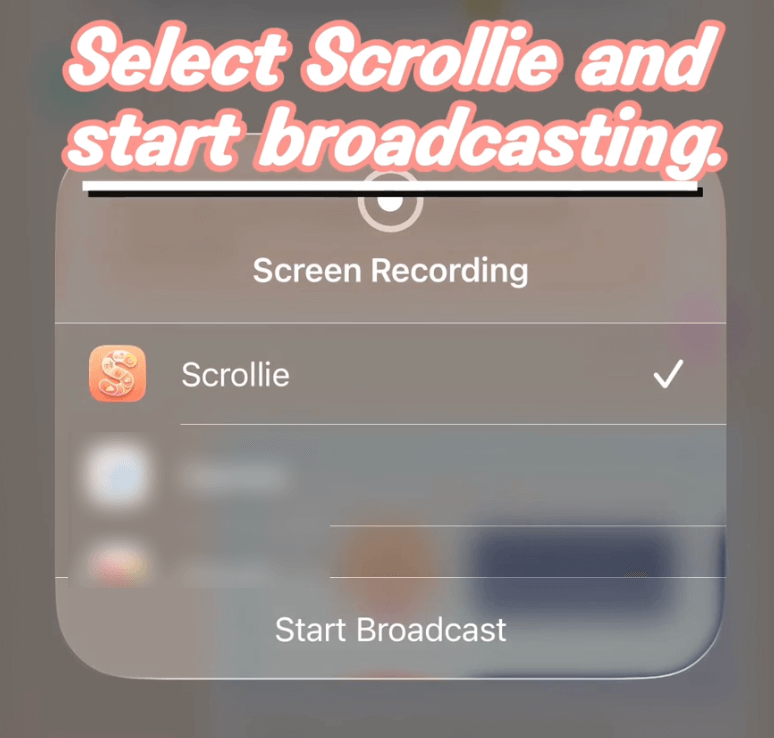
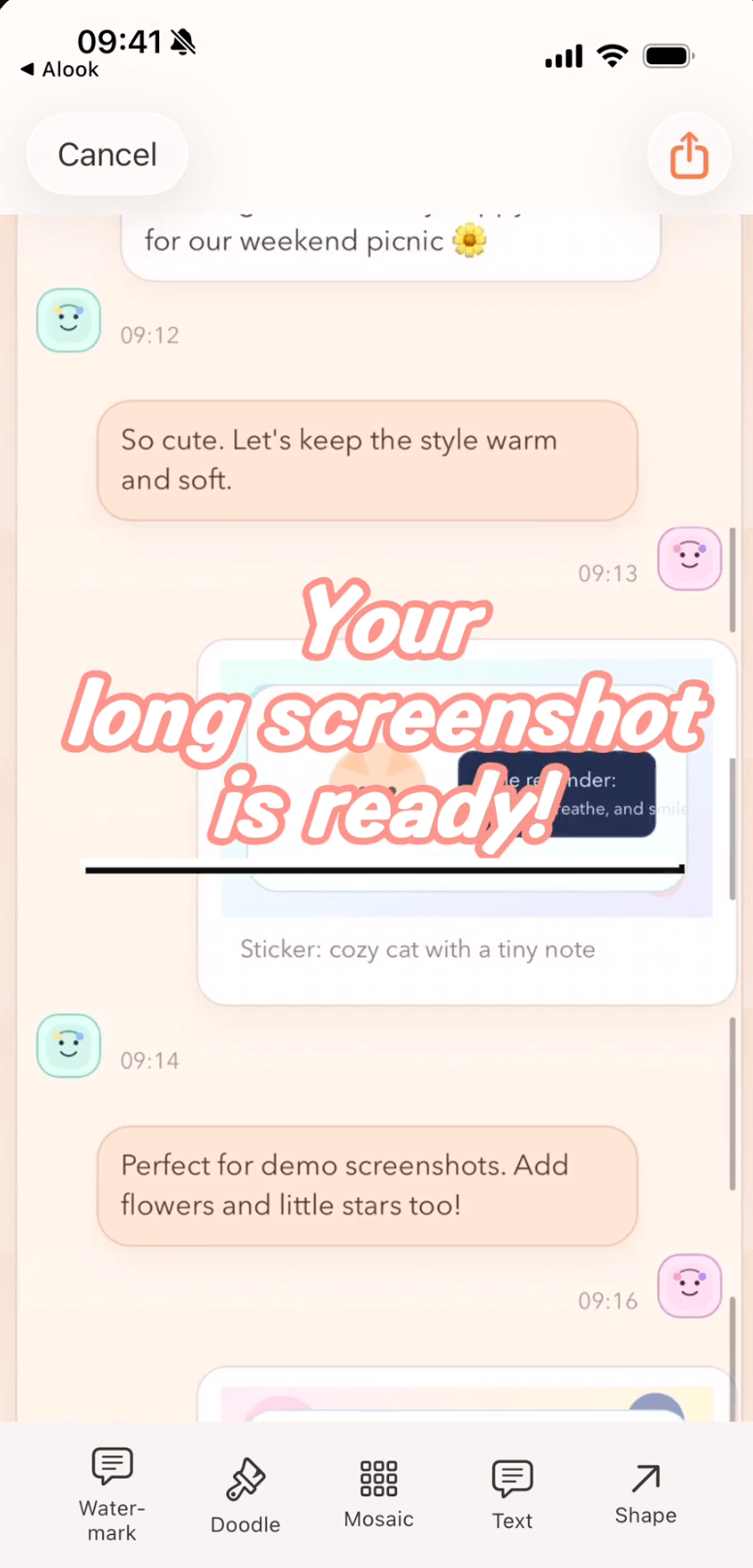
반복 편집을 줄이고 시간을 단축해 더 깔끔한 결과를 만듭니다.
기존 방식
Scrollie 사용
아니요. 핵심 스티칭은 전부 기기 내에서 처리되며 전 과정에서 클라우드와 상호작용하지 않습니다.
iOS 16+를 지원하며 iOS 18+와 iOS 16-17을 구분해 안내합니다.
도움말의 "녹화에서 긴 스크린샷" 가이드를 열어보세요.
30초 가이드부터 시작해 오늘 첫 긴 스크린샷을 완성하세요.
가입 불필요, 워터마크 없음. 이미지는 기기를 벗어나지 않고 브라우저에서 처리됩니다.
구체적인 작업별 상세 가이드와 다른 앱과의 솔직한 비교.
Add a Custom Watermark to Photos on iPhone
Pick a built-in logo or upload your own with automatic background removal. Choose Tiled or Corner Badge, then tune position, size and opacity.
Add a Device Frame to a Screenshot on iPhone
Three paths — Apple Design Resources, web mockup generators, and an on-device app — with honest limits for each.
Auto-Group Photos into Collages by Trip
Auto-group a big batch of trip photos into ready-made collages by capture time, place and content, then save the set to an album in one tap.
Combine Multiple Screenshots on iPhone
iOS has no built-in stitcher. Compare Markup, the community Shortcut, and Scrollie — with Smart Cleanup, Fine-tune seams and drafts.
Drafts Inbox & Auto-Save on iPhone Long Screenshots
Every edit is auto-saved as a draft; portrait and landscape drafts are stored separately so rotating the phone never overwrites your work.
Erase Something from a Photo on iPhone
iOS 18 Clean Up requires Apple Intelligence. Scrollie's cleanup brush works on iOS 16+ any device — honest comparison and steps.
How to Make a Photo Collage on iPhone
iOS Photos has no built-in collage. Three real paths — Freeform, Instagram Layout, and a dedicated app — with honest limits for each.
How to Screenshot a Whole Webpage on iPhone
Safari Full Page for the free PDF path; Screen Recording plus Scrollie for anything not in Safari or when you need a real image.
How to Take a Long Screenshot on iPhone
Three legitimate methods — Safari Full Page, Markup, and a dedicated app — with honest limits for each.
iPhone Mockup Generator for Screenshots
Wrap a screenshot in a real iPhone frame — iPhone 17 series with official colors, per-slice mockup, and collage integration.
Layout from Instagram Alternative for iPhone
A Layout from Instagram alternative that adds templates, per-cell edits, Cleanup brush, auto-group by trip and a long-screenshot workflow.
Long Screenshot App for iPhone — The Full Picture
Stitch screenshots, turn a screen recording into one long image, edit with a magnifier, and never lose an edit thanks to auto-saved drafts.
Long Screenshot Shortcut vs Dedicated App on iPhone
Shortcuts stitchers are free and native, but one-shot. A dedicated app keeps the result editable: Fine-tune, Cleanup brush, drafts, collage.
Photo Collage App for iPhone (2–12 Photos)
2–12 photo templates, per-cell editing with doodle, mosaic and Cleanup brush, drag-to-swap cells, and auto-saved drafts on iPhone.
Photo Grid Alternative for iPhone
A Photo Grid alternative that pairs template collages with a long-screenshot workflow, Drafts and a Cleanup brush.
PicCollage Alternative with Long Screenshots
A PicCollage alternative that brings long-screenshot workflows into a collage app: Drafts, auto-group by trip, Cleanup brush.
Picsew Alternative: Drafts, Collage & Cleanup
Same long-screenshot core, plus Drafts, template collages, Cleanup brush, and auto watermark removal — things Picsew doesn't list.
Remove Watermarks from Photos on iPhone
Cleanup brush and one-tap auto watermark removal — two tools for two scenarios, both running on-device.
Save a Chat Conversation as One Long Image on iPhone
Two paths — manual stitching or screen recording — plus how to hide the messages you don't want to share.
Screen Recording to Long Screenshot on iPhone
iOS records the scroll, Scrollie turns it into one long screenshot — auto-stop after the scroll ends, overscroll-back handled, Fine-tune magnifier for seams.
Stitch Multiple Screenshots on iPhone
Auto overlap + Smart Cleanup + Fine-tune magnifier + drafts. Vertical or horizontal, exported as JPEG/PNG/HEIC/PDF/slices.
StitchPics / 长图拼接 Alternative for iPhone
Keep the stitch and template collage you know from StitchPics. Add Drafts, auto-group photos, Cleanup brush, auto watermark removal and PDF export.
Tailor Alternative for iPhone (Actively Maintained)
Keep the classic stitch flow. Add drafts, PDF, template collages, device mockups and a Cleanup brush — the layer Tailor never added.