
チャット履歴と個人記録
長い会話をすばやく保存し、個人の記録に活用。
個人ユーザー向けに、手動結合作業を減らすワークフローを提供します。
単なるスクリーンショットツールではなく、スクロールコンテンツ向けに設計。
チャット履歴と個人記録
長い会話をすばやく保存し、個人の記録に活用。
記事・フィードの保存
長文コンテンツを1枚の見やすい画像で保存。
投稿・共有フロー
投稿や共有向けの長いスクリーンショットを効率的に作成。
モバイル中心で、PCは不要です。
画面収録を一度だけ有効化
iOS バージョンに合わせた最短手順で設定。
Scrollie でブロードキャスト開始
対象コンテンツを自然にスクロール。
Scrollie で書き出し
検出・結合・共有まで短時間で完了。
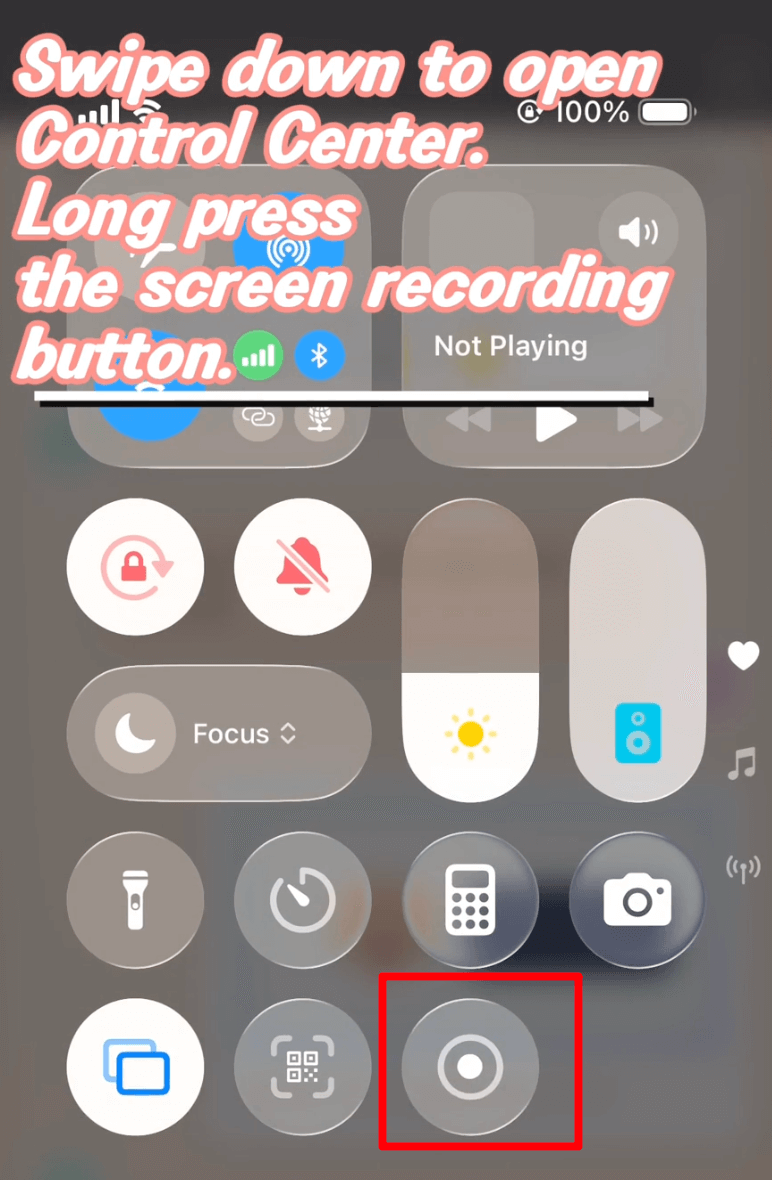
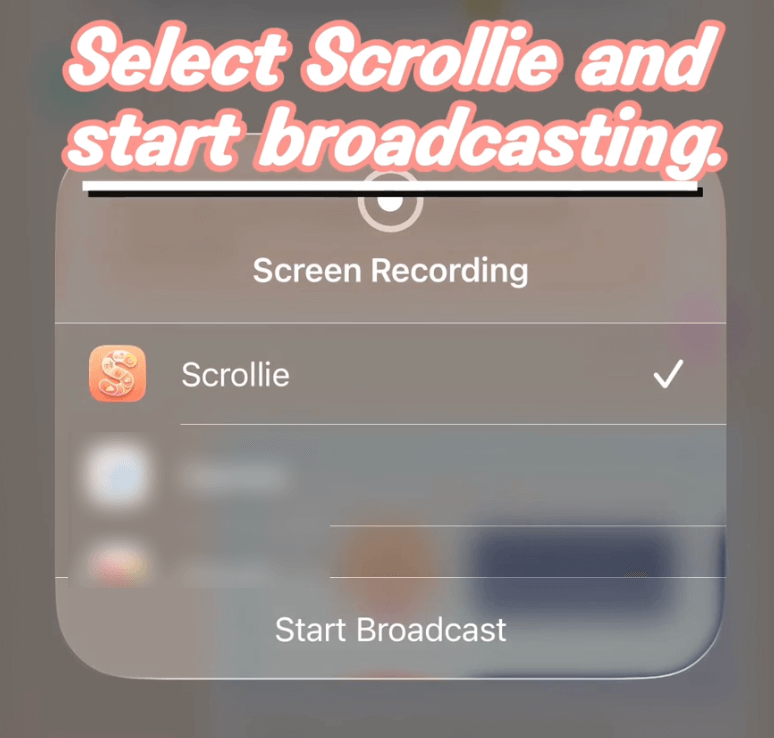
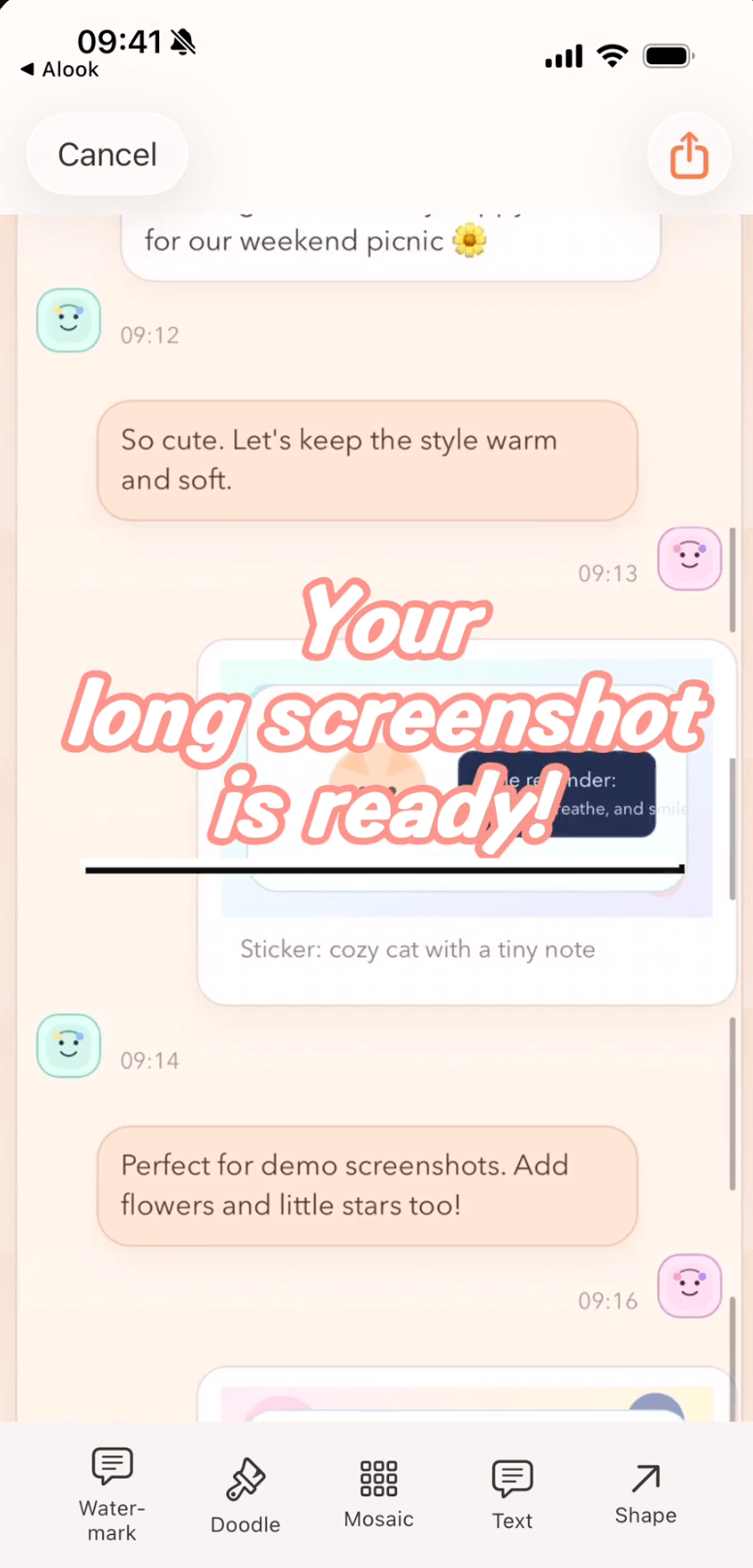
手作業を減らし、時間を短縮し、より見やすい仕上がりに。
導入前
導入後
不要です。コア結合処理はすべて端末上で完結し、クラウドとは一切やり取りしません。
iOS 16 以上をサポート。iOS 18+ と iOS 16-17 を分けて案内しています。
ヘルプの「録画から長いスクリーンショット」ガイドを開いてください。
30秒ガイドから始めて、今日中に最初の長いスクリーンショットを作成。
登録不要・透かしなし。画像は端末から出ず、すべてブラウザ内で処理されます。
個別のタスクを詳しく解説したガイドと、他アプリとの率直な比較。
Add a Custom Watermark to Photos on iPhone
Pick a built-in logo or upload your own with automatic background removal. Choose Tiled or Corner Badge, then tune position, size and opacity.
Add a Device Frame to a Screenshot on iPhone
Three paths — Apple Design Resources, web mockup generators, and an on-device app — with honest limits for each.
Auto-Group Photos into Collages by Trip
Auto-group a big batch of trip photos into ready-made collages by capture time, place and content, then save the set to an album in one tap.
Combine Multiple Screenshots on iPhone
iOS has no built-in stitcher. Compare Markup, the community Shortcut, and Scrollie — with Smart Cleanup, Fine-tune seams and drafts.
Drafts Inbox & Auto-Save on iPhone Long Screenshots
Every edit is auto-saved as a draft; portrait and landscape drafts are stored separately so rotating the phone never overwrites your work.
Erase Something from a Photo on iPhone
iOS 18 Clean Up requires Apple Intelligence. Scrollie's cleanup brush works on iOS 16+ any device — honest comparison and steps.
How to Make a Photo Collage on iPhone
iOS Photos has no built-in collage. Three real paths — Freeform, Instagram Layout, and a dedicated app — with honest limits for each.
How to Screenshot a Whole Webpage on iPhone
Safari Full Page for the free PDF path; Screen Recording plus Scrollie for anything not in Safari or when you need a real image.
How to Take a Long Screenshot on iPhone
Three legitimate methods — Safari Full Page, Markup, and a dedicated app — with honest limits for each.
iPhone Mockup Generator for Screenshots
Wrap a screenshot in a real iPhone frame — iPhone 17 series with official colors, per-slice mockup, and collage integration.
Layout from Instagram Alternative for iPhone
A Layout from Instagram alternative that adds templates, per-cell edits, Cleanup brush, auto-group by trip and a long-screenshot workflow.
Long Screenshot App for iPhone — The Full Picture
Stitch screenshots, turn a screen recording into one long image, edit with a magnifier, and never lose an edit thanks to auto-saved drafts.
Long Screenshot Shortcut vs Dedicated App on iPhone
Shortcuts stitchers are free and native, but one-shot. A dedicated app keeps the result editable: Fine-tune, Cleanup brush, drafts, collage.
Photo Collage App for iPhone (2–12 Photos)
2–12 photo templates, per-cell editing with doodle, mosaic and Cleanup brush, drag-to-swap cells, and auto-saved drafts on iPhone.
Photo Grid Alternative for iPhone
A Photo Grid alternative that pairs template collages with a long-screenshot workflow, Drafts and a Cleanup brush.
PicCollage Alternative with Long Screenshots
A PicCollage alternative that brings long-screenshot workflows into a collage app: Drafts, auto-group by trip, Cleanup brush.
Picsew Alternative: Drafts, Collage & Cleanup
Same long-screenshot core, plus Drafts, template collages, Cleanup brush, and auto watermark removal — things Picsew doesn't list.
Remove Watermarks from Photos on iPhone
Cleanup brush and one-tap auto watermark removal — two tools for two scenarios, both running on-device.
Save a Chat Conversation as One Long Image on iPhone
Two paths — manual stitching or screen recording — plus how to hide the messages you don't want to share.
Screen Recording to Long Screenshot on iPhone
iOS records the scroll, Scrollie turns it into one long screenshot — auto-stop after the scroll ends, overscroll-back handled, Fine-tune magnifier for seams.
Stitch Multiple Screenshots on iPhone
Auto overlap + Smart Cleanup + Fine-tune magnifier + drafts. Vertical or horizontal, exported as JPEG/PNG/HEIC/PDF/slices.
StitchPics / 长图拼接 Alternative for iPhone
Keep the stitch and template collage you know from StitchPics. Add Drafts, auto-group photos, Cleanup brush, auto watermark removal and PDF export.
Tailor Alternative for iPhone (Actively Maintained)
Keep the classic stitch flow. Add drafts, PDF, template collages, device mockups and a Cleanup brush — the layer Tailor never added.