
Historial de chat y registros personales
Guarda hilos largos para notas y registros personales.
Para personas que necesitan capturar contenido largo sin unir manualmente.
No es otra app de captura: está optimizada para contenido con desplazamiento.
Historial de chat y registros personales
Guarda hilos largos para notas y registros personales.
Archivo de artículos y feeds
Guarda contenido largo en una sola imagen limpia.
Flujo para creadores
Genera capturas largas listas para publicar.
Flujo móvil, sin necesidad de PC.
Activa Screen Recording una vez
Sigue la ruta corta según tu versión de iOS.
Inicia Broadcast con Scrollie
Desplázate de forma natural mientras grabas.
Abre Scrollie y exporta
Detecta, une y comparte en minutos.
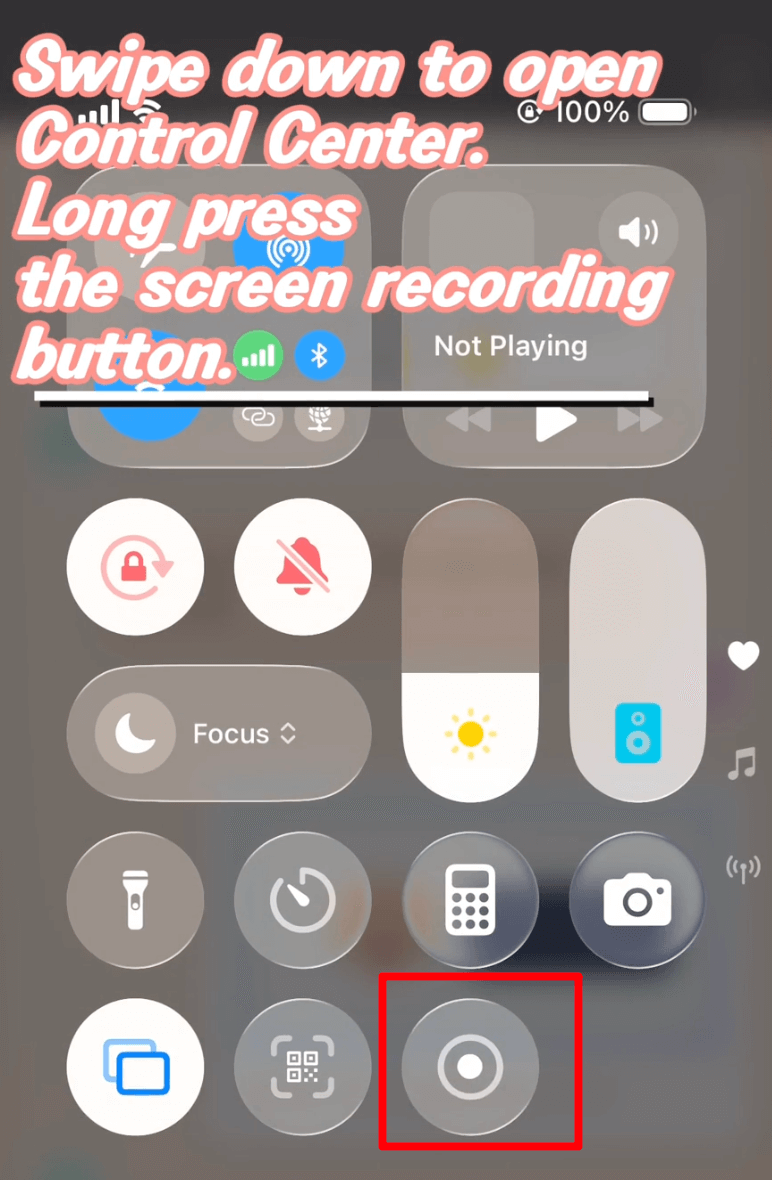
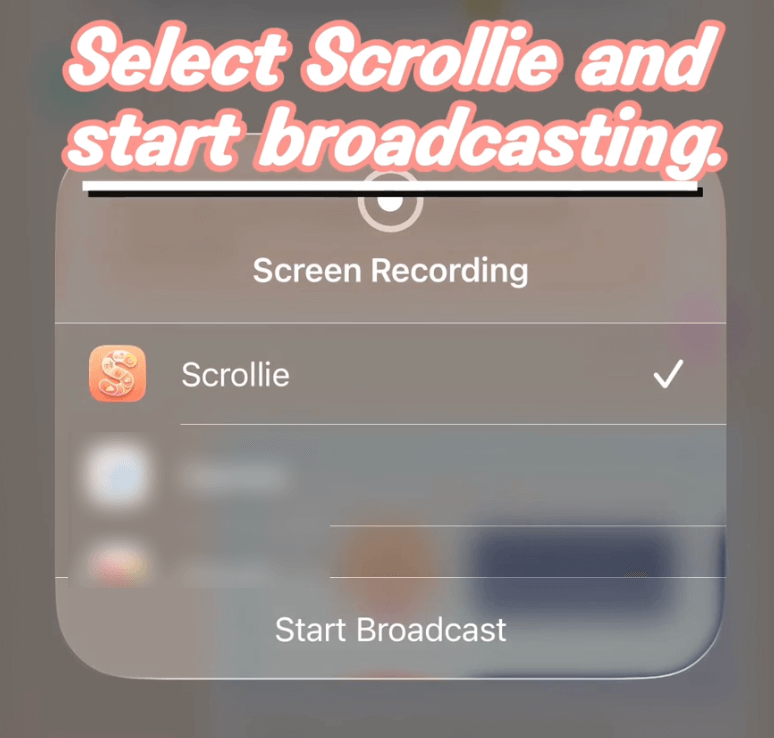
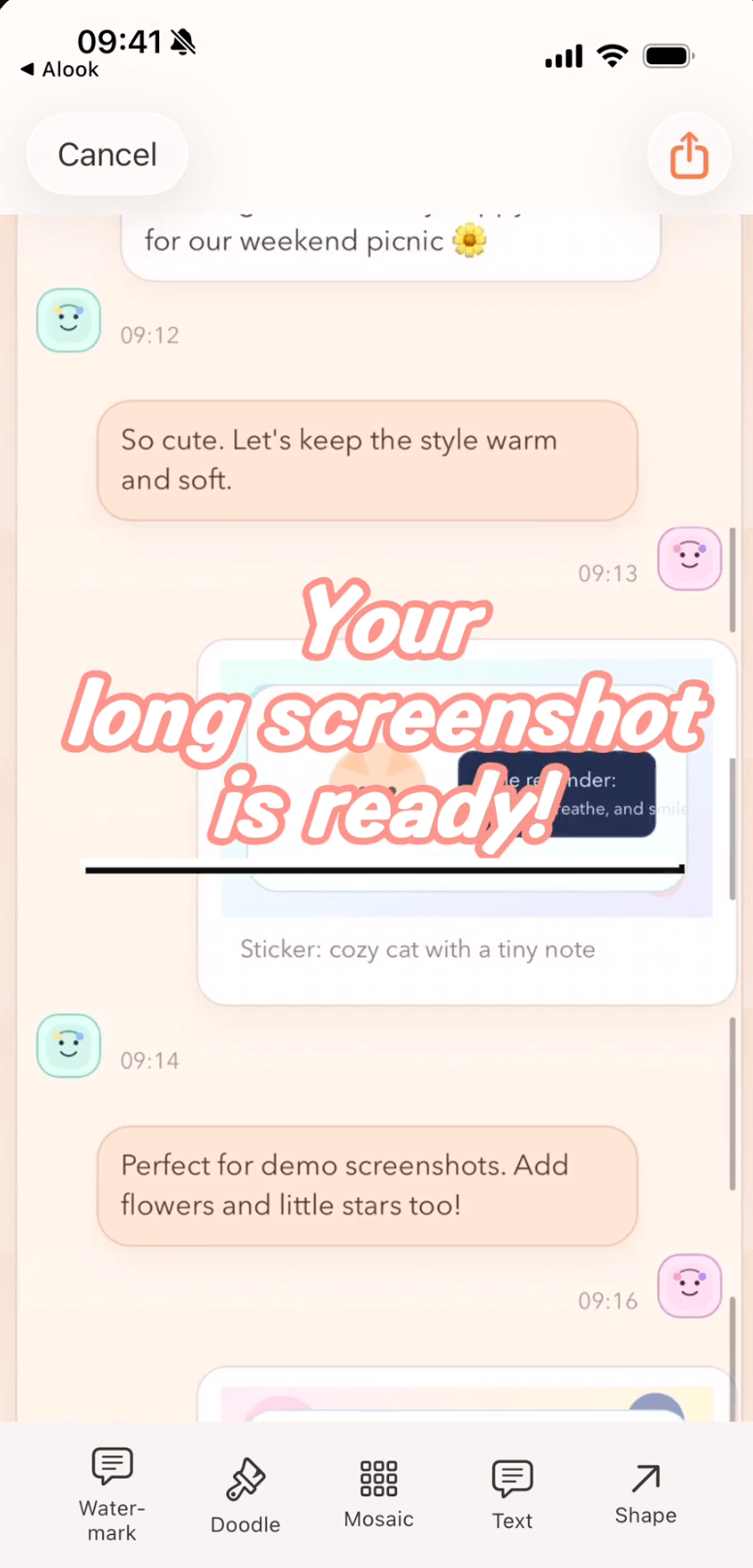
Menos edición manual, menos tiempo y capturas más limpias.
Antes de Scrollie
Con Scrollie
No. El flujo de unión principal se procesa totalmente en el dispositivo, sin interacción con la nube.
Scrollie soporta iOS 16+. La guía separa iOS 18+ e iOS 16-17.
Abre Ayuda y entra en "De grabación a captura larga".
Empieza con la guía de 30 segundos y crea tu primera captura larga hoy.
Sin registro ni marca de agua, y tus imágenes nunca salen del dispositivo: todo ocurre en el navegador.
Tutoriales detallados por tarea y comparaciones honestas con otras apps.
Add a Custom Watermark to Photos on iPhone
Pick a built-in logo or upload your own with automatic background removal. Choose Tiled or Corner Badge, then tune position, size and opacity.
Add a Device Frame to a Screenshot on iPhone
Three paths — Apple Design Resources, web mockup generators, and an on-device app — with honest limits for each.
Auto-Group Photos into Collages by Trip
Auto-group a big batch of trip photos into ready-made collages by capture time, place and content, then save the set to an album in one tap.
Combine Multiple Screenshots on iPhone
iOS has no built-in stitcher. Compare Markup, the community Shortcut, and Scrollie — with Smart Cleanup, Fine-tune seams and drafts.
Drafts Inbox & Auto-Save on iPhone Long Screenshots
Every edit is auto-saved as a draft; portrait and landscape drafts are stored separately so rotating the phone never overwrites your work.
Erase Something from a Photo on iPhone
iOS 18 Clean Up requires Apple Intelligence. Scrollie's cleanup brush works on iOS 16+ any device — honest comparison and steps.
How to Make a Photo Collage on iPhone
iOS Photos has no built-in collage. Three real paths — Freeform, Instagram Layout, and a dedicated app — with honest limits for each.
How to Screenshot a Whole Webpage on iPhone
Safari Full Page for the free PDF path; Screen Recording plus Scrollie for anything not in Safari or when you need a real image.
How to Take a Long Screenshot on iPhone
Three legitimate methods — Safari Full Page, Markup, and a dedicated app — with honest limits for each.
iPhone Mockup Generator for Screenshots
Wrap a screenshot in a real iPhone frame — iPhone 17 series with official colors, per-slice mockup, and collage integration.
Layout from Instagram Alternative for iPhone
A Layout from Instagram alternative that adds templates, per-cell edits, Cleanup brush, auto-group by trip and a long-screenshot workflow.
Long Screenshot App for iPhone — The Full Picture
Stitch screenshots, turn a screen recording into one long image, edit with a magnifier, and never lose an edit thanks to auto-saved drafts.
Long Screenshot Shortcut vs Dedicated App on iPhone
Shortcuts stitchers are free and native, but one-shot. A dedicated app keeps the result editable: Fine-tune, Cleanup brush, drafts, collage.
Photo Collage App for iPhone (2–12 Photos)
2–12 photo templates, per-cell editing with doodle, mosaic and Cleanup brush, drag-to-swap cells, and auto-saved drafts on iPhone.
Photo Grid Alternative for iPhone
A Photo Grid alternative that pairs template collages with a long-screenshot workflow, Drafts and a Cleanup brush.
PicCollage Alternative with Long Screenshots
A PicCollage alternative that brings long-screenshot workflows into a collage app: Drafts, auto-group by trip, Cleanup brush.
Picsew Alternative: Drafts, Collage & Cleanup
Same long-screenshot core, plus Drafts, template collages, Cleanup brush, and auto watermark removal — things Picsew doesn't list.
Remove Watermarks from Photos on iPhone
Cleanup brush and one-tap auto watermark removal — two tools for two scenarios, both running on-device.
Save a Chat Conversation as One Long Image on iPhone
Two paths — manual stitching or screen recording — plus how to hide the messages you don't want to share.
Screen Recording to Long Screenshot on iPhone
iOS records the scroll, Scrollie turns it into one long screenshot — auto-stop after the scroll ends, overscroll-back handled, Fine-tune magnifier for seams.
Stitch Multiple Screenshots on iPhone
Auto overlap + Smart Cleanup + Fine-tune magnifier + drafts. Vertical or horizontal, exported as JPEG/PNG/HEIC/PDF/slices.
StitchPics / 长图拼接 Alternative for iPhone
Keep the stitch and template collage you know from StitchPics. Add Drafts, auto-group photos, Cleanup brush, auto watermark removal and PDF export.
Tailor Alternative for iPhone (Actively Maintained)
Keep the classic stitch flow. Add drafts, PDF, template collages, device mockups and a Cleanup brush — the layer Tailor never added.